A brain for
your LATEX.
A desktop editor for academic writing, with the agent inside.*
Abstract. Describe the change you want. The agent edits your .tex directly, you review each diff, and the PDF rebuilds on your machine, with no server in the loop. The free tier ships the full editor and compiler; Pro adds the agent: every model, no API keys to configure [1]. Your prose lives on your filesystem and compiles locally. Only the agent reaches out, and only for what you ask.
1The editor
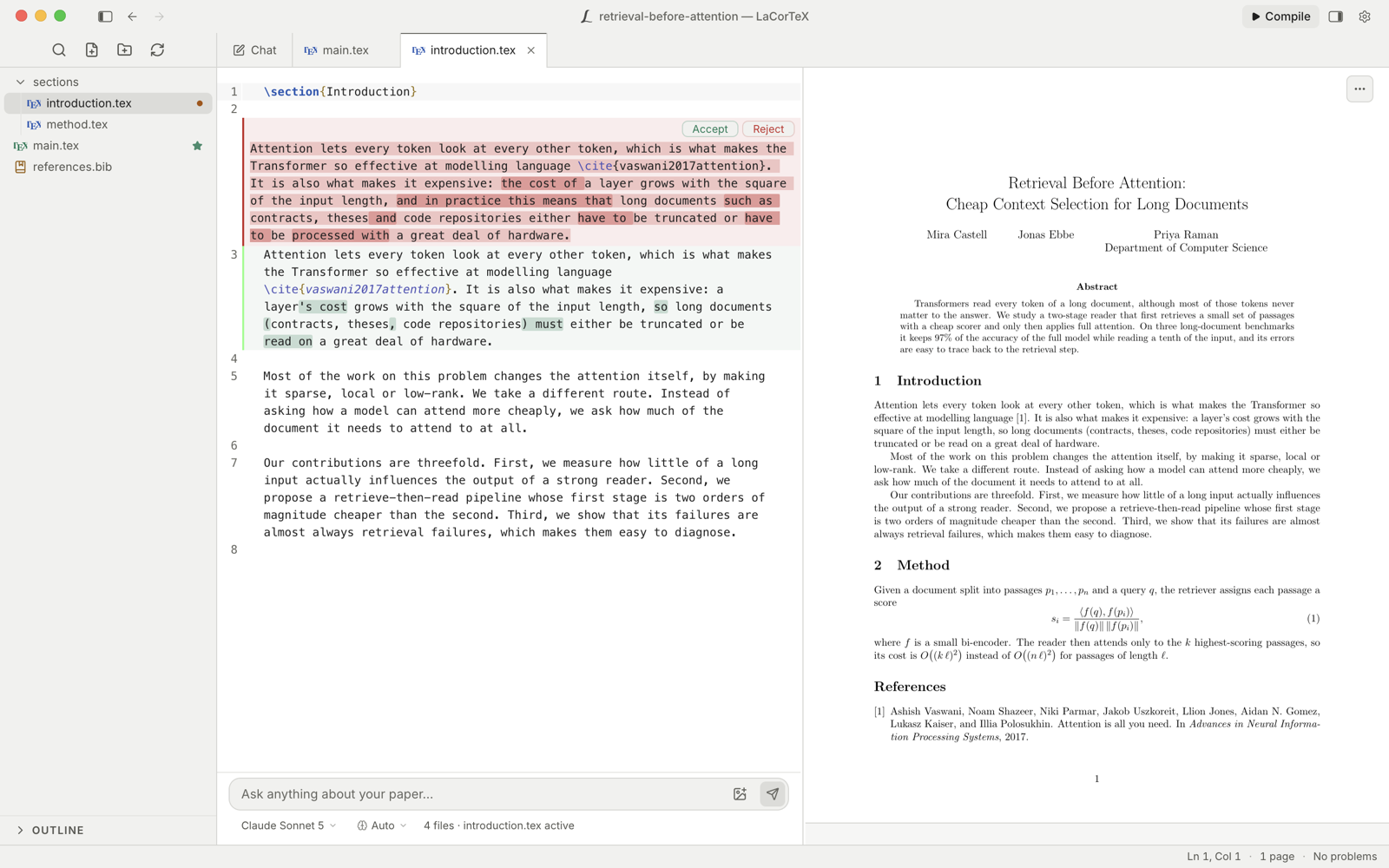
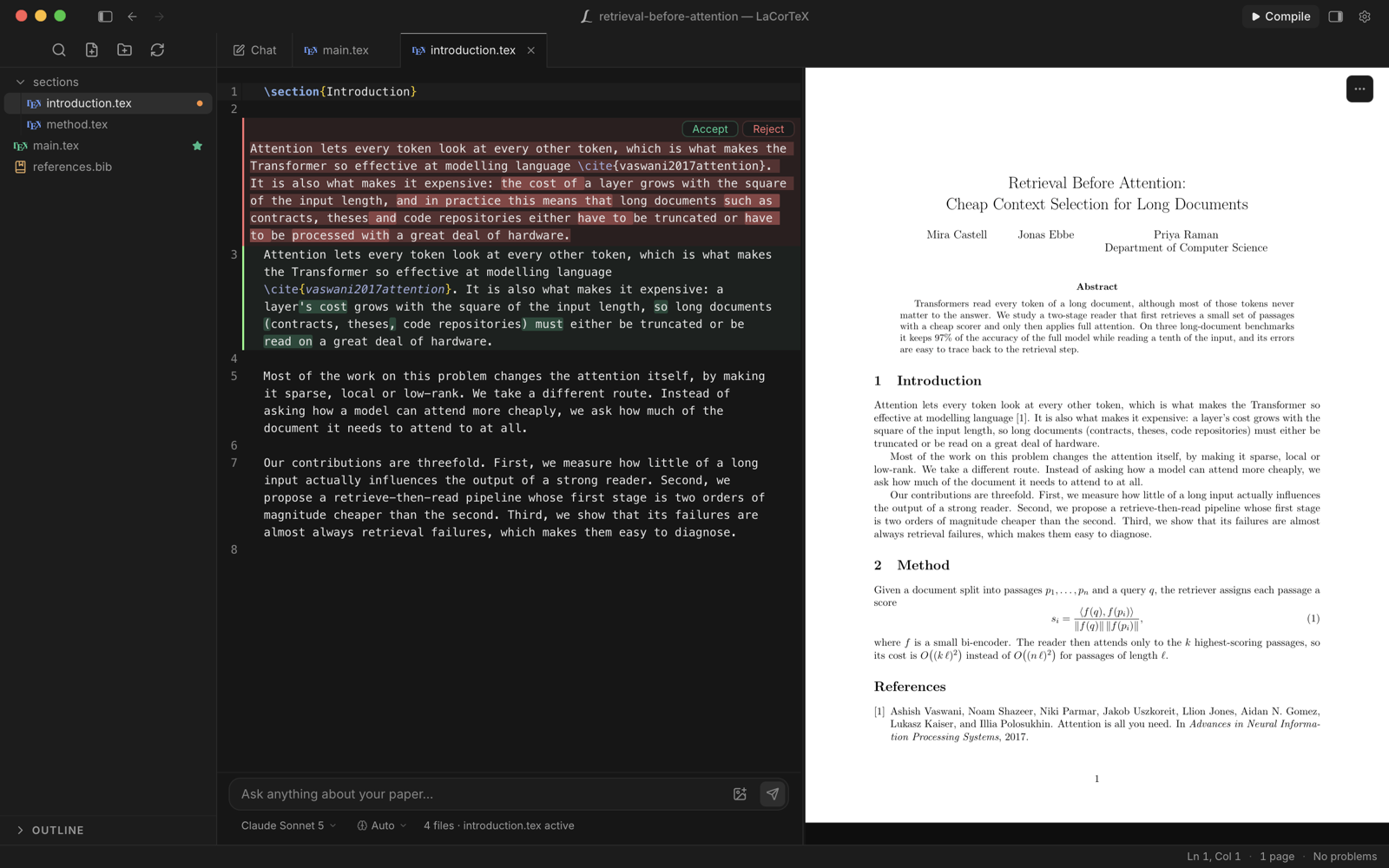
Two panes. Code on the left, live PDF on the right. The agent shares the same view; its chat input sits at the bottom of the editor pane, so a conversation about your manuscript happens inside your manuscript. Every change the agent makes comes back as an inline diff you keep or put back, the way you would review a colleague’s edits.
2Three operations
Three keystrokes do the entire job.
Open the agent. Describe any change: a paragraph rewrite, a new lemma, a citation insertion. The agent reads what it needs and makes the edit, then shows you every change as a diff to keep or put back.
Rewrite inline. Select prose and the rewrite popup appears. Say what you want; the diff lands in place, voice preserved and citations intact.
Jump anywhere. Any file or command from the palette, including adding a reference by DOI or arXiv id. ⌘ ⇧ F searches the text of every file in the project.
3Citations, done
Ask the agent for the paper you mean and it searches arXiv, then inserts the one you pick in your project’s existing format: a .bib entry if you have one, a \bibitem if the file uses inline bibliography, or it scaffolds references.bib for you. Already have the identifier? Add it by DOI or arXiv id from the palette, and a paper you already cite is not added twice. Typing \cite{ completes keys from your own bibliography.
> search_arxiv · "attention mechanism transformer" [1] Attention Is All You Need Vaswani et al. · 2017 · arXiv:1706.03762 [2] Layer Normalization Ba, Kiros, Hinton · 2016 · arXiv:1607.06450 [3] Self-Attention with Relative Position Representations Shaw, Uszkoreit, Vaswani · 2018 · arXiv:1803.02155 ────────────────────────────────────────────────> insert_citation · vaswani2017attention refs.bib +6 lines main.tex \cite{vaswani2017attention} inserted ✓
4Specification
- Compiler
- TeX Live 2026 · WebAssembly · on-device · common packages bundled, the rest fetched on demand
- Agent
- Multiple frontier models · no API key on any plan · routed only to endpoints that retain nothing · creates and splits files · repairs a build its edits broke
- Editing
- apply_edit per file · inline diff overlay · accept / reject per change · native undo
- Citations
- arXiv search through the agent · detects BibTeX vs. inline thebibliography · import by DOI or arXiv id, formatted and de-duplicated · \cite and \ref key completion
- Two-way SyncTeX: ⌘ click in the PDF opens the source, ⌥ ⌘ J finds the cursor in the PDF · zoom · a window of its own · export PDF or the source as ZIP
- Search
- ⌘ P palette · files and commands · ⌘ ⇧ F text in every file
- Appearance
- Dark and Light themes
- Files
- Ordinary files in an ordinary folder · your own git, your own backups · no project lock-in
- Platforms
- macOS (Apple silicon) · Windows x64 (NSIS + portable) · Linux x64 (AppImage + .deb)
- Network
- Compilation is local · model calls require connectivity · offline once warmed
- Pricing
- Free: the full editor and compiler, no AI · Pro $20/mo: the agent
5Locality
Theorem 1 (Locality). Typing, compilation, and rendering are on-device, and your files never leave your filesystem unless you ask.
Proof. The compiler is TeX Live 2026 compiled to WebAssembly; open a folder, press ⌘ ↩, and the PDF rebuilds on your machine. CTAN packages are fetched once and cached on-disk. Your project is a real directory, so git pull and push work as they always have. The only network call is the agent itself, made only when you press ⌘ J or select, and it carries only the slice of context that call needs.∎
6Availability
One installer per platform, when they are ready. macOS goes first, because its signing is the part that is solved, and Windows follows once its certificate is in place. Each installer will carry the editor and a warm-once WASM compiler; packages arrive the first time you need them, then live on-disk.
$ brew install --cask lacortex
$ winget install LaCorTeX.LaCorTeX
Acknowledgments. To everyone who has ever fought a \usepackage conflict at 2 a.m. the night before a deadline: this is for you.
The editor will be free, forever. We will write to you the day it ships.